
Skip to the content
Handdy Estimates Help and SupportHanddy Estimates Help and Support
  • Help and Support
  • Help and Support
Categories
Reports

How do I view accepted estimates?

  • Post author By handdyaccounts_help
  • Post date January 23, 2016

How do I view accepted estimates?
408 views

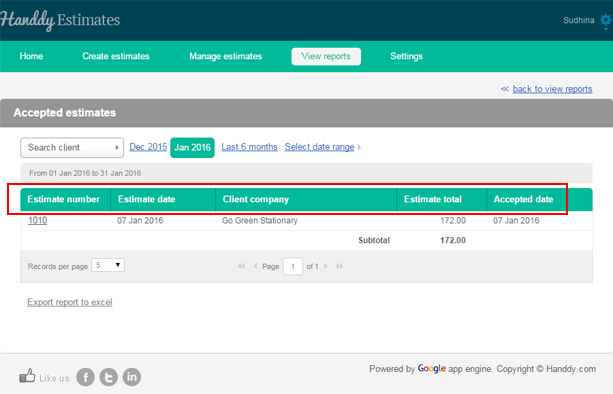
  • Go to ‘View reports’, >> ‘Reports’, >> ‘Accepted estimates’
  • You can select the current month, previous month or a date range to view all the accepted estimates at the month.
  • The accepted estimates will be displayed
01


Answer to more questions

← How do I view all estimates? → How do i view rejected Estimates?

Recent Posts

  • Logo for estimate
  • What is ‘Notes to customer’?
  • Estimate template
  • What are the different email settings
  • How to add product or service details

Categories

  • Creating an estimate
  • Manage estimates
  • Reports
  • Settings

Need more help? Email us and we will reply back

© 2026 Handdy Timesheets. All rights reserved

To the top ↑ Up ↑