
Skip to content
Handdy Invoice Help and Support
  • HELP AND SUPPORT

How do I enter my Paypal information?

1. Login to your account
2. Go to>> Settings>> Online payment settings>>  Payment Gateway
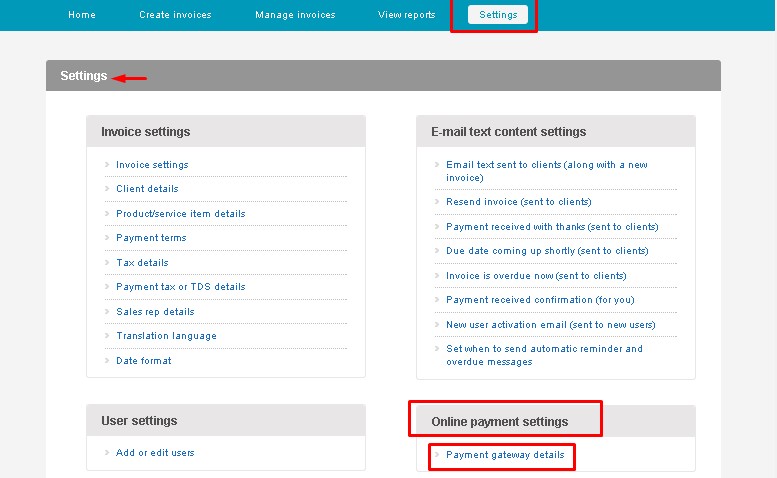
Q7 SS 1

3. Check the option “PayPal standard”
4. Enter your PayPal E-mail id.
5. Click ‘Update’.
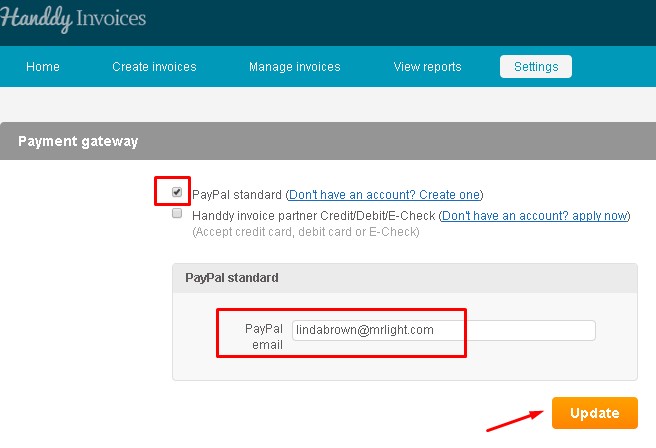
 

Q7 SS 2


Note

Have you tried our online accounting software for small business owners yet? Get it now

←How do I create an invoice?
How do I add new products one at time or upload in bulk using an Excel spreadsheet?→

Recent Posts

  • What is tax over tax? How to create this and how will it be displayed in my invoice?
  • What is payment tax. How do I create, edit and delete this tax?
  • Is it possible to edit taxes if they are used in an invoice ?
  • Is it possible to delete taxes if it is used in an invoice?
  • When and how can I use group tax? How to create, edit and delete a group tax? How will it appear in the invoice?

Categories

  • Creating an invoice
  • Manage Invoices
  • Payments
  • Reports
  • Settings
  • What's more on support

Need more help? Email us and we will reply back

© 2026 Handdy Timesheets. All rights reserved