Skip to content
HELP AND SUPPORT
Search
SEARCH
How can I change the format of the date in my invoice?
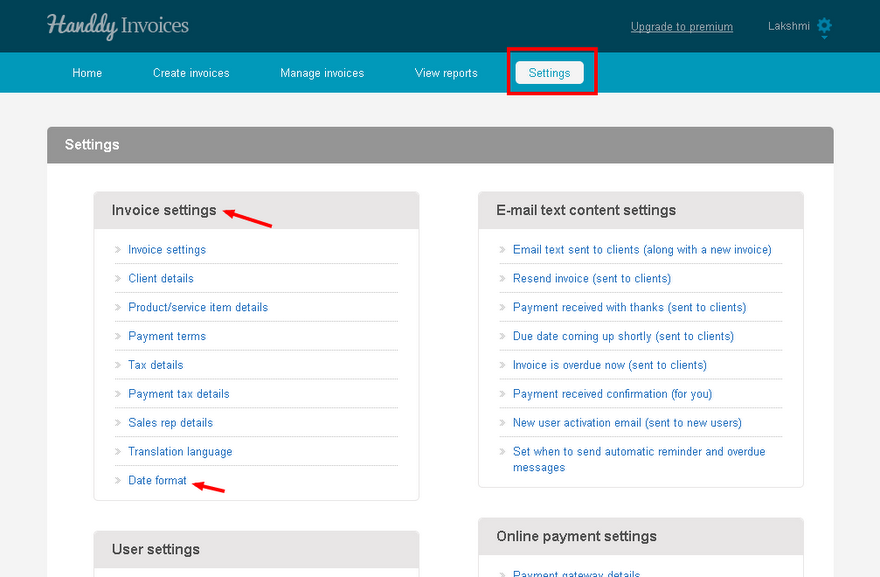
In ‘Settings’, under ‘Invoice settings’, select ‘Date format’ option
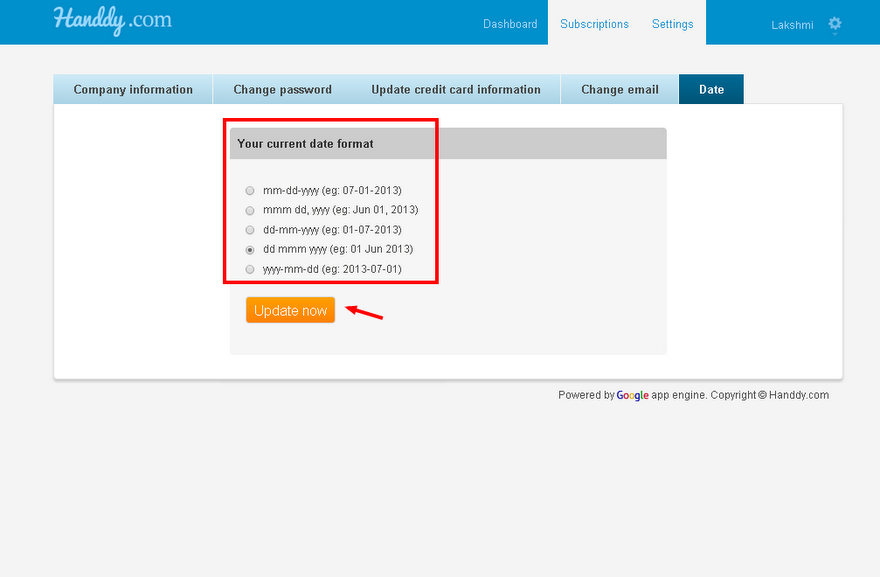
Choose the format of the date from ‘Current date format option’
Hit ‘Update now’ button.
Changed date format will reflect in the invoices that you create
←
How do I change the language in which the invoice is created?
How do I change my company address?
→
Recent Posts
What is tax over tax? How to create this and how will it be displayed in my invoice?
What is payment tax. How do I create, edit and delete this tax?
Is it possible to edit taxes if they are used in an invoice ?
Is it possible to delete taxes if it is used in an invoice?
When and how can I use group tax? How to create, edit and delete a group tax? How will it appear in the invoice?
Categories
Creating an invoice
Manage Invoices
Payments
Reports
Settings
What's more on support