
Skip to the content
Handdy Accounts Help and SupportHanddy Accounts Help and Support
  • Help and Support
  • Help and Support
Categories
Income

How do I enter an Income?

  • Post author By admin
  • Post date August 30, 2012

How do I enter an Income?
435 views

1. Login to your account.
2. Click on “Enter Income” on the Home Page.
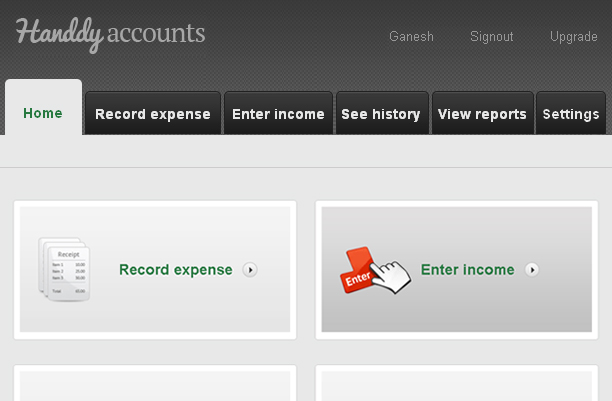
enter-income-one

3. This takes you to the “Enter Income” page.

4. Enter all details and click on “Save”
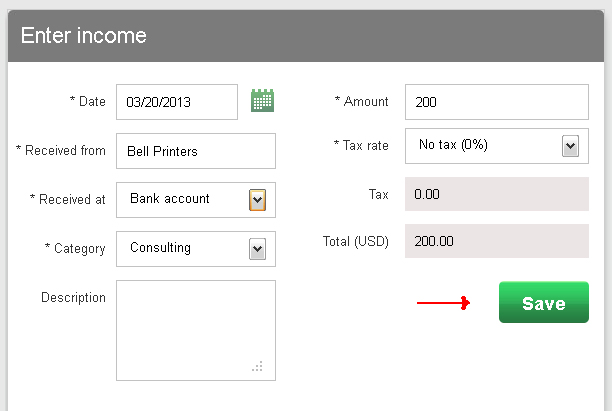
enter-income-1


Note

Did you try our online invoicing software for small businesses yet? Try it for free now


Answer to more questions

← How do I edit an expense? → How do I edit an income?

Recent Posts

  • How do I see my profit or loss information?
  • How do I enter a new Income Category?
  • What settings can I do?
  • How do I add a Customer for my income?
  • What information is available in account history? How do I use it?

Categories

  • Expenses
  • Income
  • Reports
  • What's more on support

Need more help? Email us and we will reply back

© 2026 Handdy Timesheets. All rights reserved

To the top ↑ Up ↑

We use cookies to provide the services and features offered on our website, and to improve our user experience. By continuing to use this site you consent to the use of cookies.