
Skip to the content
Handdy Accounts Help and SupportHanddy Accounts Help and Support
  • Help and Support
  • Help and Support
Categories
Income

How do I enter an Income?

  • Post author By admin
  • Post date August 30, 2012

How do I enter an Income?
522 views

1. Login to your account.
2. Click on “Enter Income” on the Home Page.
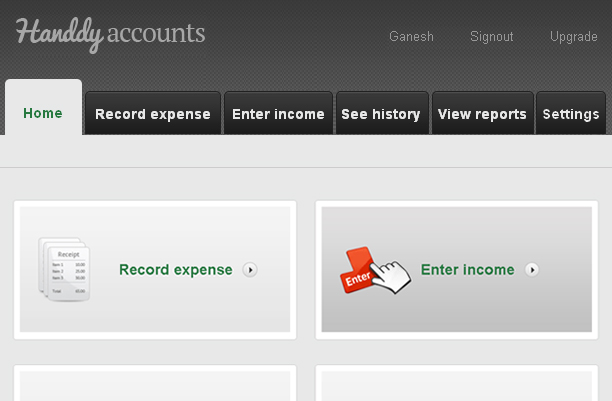
enter-income-one

3. This takes you to the “Enter Income” page.

4. Enter all details and click on “Save”
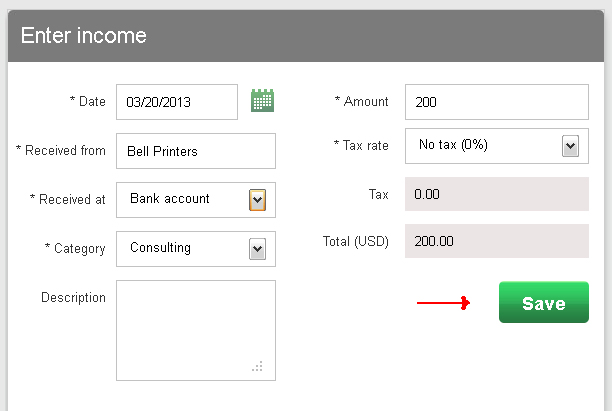
enter-income-1


Note

Did you try our online invoicing software for small businesses yet? Try it for free now


Answer to more questions

← How do I edit an expense? → How do I edit an income?

Recent Posts

  • How do I see my profit or loss information?
  • How do I enter a new Income Category?
  • What settings can I do?
  • How do I add a Customer for my income?
  • What information is available in account history? How do I use it?

Categories

  • Expenses
  • Income
  • Reports
  • What's more on support

Need more help? Email us and we will reply back

© 2026 Handdy Timesheets. All rights reserved

To the top ↑ Up ↑